
SSFeatures for Smartsheet
SSFeatures is a browser extension that adds more than 25 time-saving tools to Smartsheet, from rows that sort themselves to bulk column edits and cleaner PDF and Excel exports. We use it on client work every day, and as an SSFeatures partner we can help your team get set up.
No sign-up or credit card required for the trial.
4.9★
Average user rating
3,000+
Smartsheet users
30 days
Free trial, no credit card
4 browsers
Chrome, Edge, Firefox and Safari
Figures published by SSFeatures on ssfeatures.com. SSFeatures runs in your browser and, per SSFeatures, never sends your Smartsheet data to its servers.
Why Teams Add It
SSFeatures takes care of the repetitive work that slows down admins and power users, without changing how your sheets are built.
Today
Sorting
Re-sort rows by hand every time a form submission or update lands.
Hover or tap to flip ↻
With SSFeatures
Sorting
Rows stay in order automatically as new data comes in.
✓ Included in the free trial
Today
Hidden Columns
Click Unhide All, then re-hide every column you didn't need.
Hover or tap to flip ↻
With SSFeatures
Hidden Columns
Unhide just the column you need, picked from a list.
✓ Included in the free trial
Today
Cross-Sheet References
Build cross-sheet references one at a time.
Hover or tap to flip ↻
With SSFeatures
Cross-Sheet References
Create cross-sheet references in bulk.
✓ Included in the free trial
Today
Automations & Formats
Rebuild automations and conditional formats rule by rule on every new sheet.
Hover or tap to flip ↻
With SSFeatures
Automations & Formats
Copy and paste them to another sheet in a few clicks.
✓ Included in the free trial
Today
Report Exports
Settle for the default layout when exporting grouped reports.
Hover or tap to flip ↻
With SSFeatures
Report Exports
Export grouped reports to PDF or Excel the way you need them.
✓ Included in the free trial
Today
Column Changes
Create, rename or delete columns a handful at a time.
Hover or tap to flip ↻
With SSFeatures
Column Changes
Create, rename or delete many columns at once.
✓ Included in the free trial
What You Get
Grouped by what they help you do. Every feature is included in the trial and the paid license.
Keep sheets in order and find what you need fast.
Automatically Sort Rows, including after form submissions
Sort with filters turned on
Hide or unhide specific columns
Go to Column to jump straight to any column
Get data out cleanly and back in without new sheets.
PDF Exporter with printing and email
Excel Exporter, including grouped reports
Import Excel or CSV into an existing sheet
Reuse what you've already built.
Automation workflows
Conditional formats
Columns
Cross-sheet references
Make sheet-wide changes in one step.
Bulk create, delete and rename columns
Column templates for new sheets
Bulk clone conditional formats
Remove columns from all conditional format rules
See how everything is connected.
View all column info: formulas, types and descriptions
View and bulk create cross-sheet references
Find column IDs
See column descriptions and source sheets in reports
Catch problems before users do.
Sheet Stats for rows, columns and references
Sheet limit alerts as you approach a limit
Spell check sheets and reports
Capitalization rules and full text in automation workflows
See It in Action
Short recordings of the tools teams use most. Everything shown is included in the free trial.
Install SSFeatures and test it on your own sheets today. No credit card required for the trial. When you are ready to buy, use code TCC for a discount.
Discount code
TCC
01 · Columns
Unhide just the columns you need from a list, instead of using Unhide All and re-hiding everything else.
02 · Automations
Copy automation workflows from one sheet to another in seconds, instead of rebuilding each trigger, condition and action by hand.
03 · Formatting
Move conditional formatting rules between sheets or within the same sheet. Rules are matched by column name, so the destination sheet needs the same column names.
04 · Import
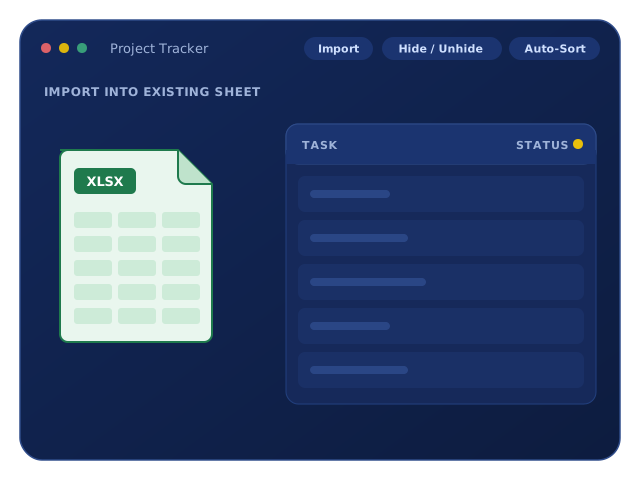
Bring in Excel, CSV, OpenDocument or TXT files without creating a new sheet. Map the columns, then append rows, replace the data, or merge on a unique key column.
05 · Columns
Duplicate columns within a sheet or copy them to another sheet with their settings intact: column type, formatting, descriptions and column formulas.
Built for Teams & IT
SSFeatures is licensed per user and managed centrally, so admins stay in control of who has access.
Available for Chrome, Edge, Firefox and Safari. SSFeatures works inside Smartsheet in the browser, and per SSFeatures your sheet data is not sent to its servers.
Buy licenses only for the people who need them. Add users by email, or enable your whole company domain (for example @yourcompany.com).
Share license management across your team. Add, remove or transfer licenses at any time from the SSFeatures dashboard.
Larger rollouts (50+ licenses) have enterprise pricing. We can help you size the rollout and work through setup.
Reach out and we'll help you set up a corporate account, decide who needs a license, connect your company domain and roll it out with your Smartsheet admins.
Why We Recommend It
Auto-sort, bulk column tools and the cross-sheet reference features save our consultants time on Smartsheet builds. We recommend what we use.
Include SSFeatures in a Smartsheet engagement and we'll configure it, show your admins the features that matter for your sheets and fold it into your standards.
Sheet Stats, limit alerts and column info pair well with our Smartsheet Optimization & Health Checks to keep your sheets clean as they grow.
Getting Started
01
Install SSFeatures through our partner link. Full access for 30 days, no sign-up or credit card.
02
Turn on auto-sort, export a grouped report or bulk-edit columns on the sheets you use every day.
03
Keep it for yourself, or talk to us about corporate licenses and setup for your team.
Frequently Asked Questions
According to SSFeatures, the extension runs entirely in your browser and never sends your Smartsheet data to its servers.
Chrome, Edge, Firefox and Safari.
No. The 30-day trial includes every feature and doesn't require a sign-up or credit card.
Per user. You buy licenses only for the Smartsheet users who need SSFeatures, and you can add users by email or enable your company domain. Current pricing is on the SSFeatures website.
Yes. SSFeatures adds features to Smartsheet in your browser. It works with your existing Smartsheet account and sheets.
Yes. We can help you set up a corporate account, assign licenses and show your team the features that matter most for how you use Smartsheet.
Try It Free
Start a 30-day free trial through our partner link, or talk to us about licenses and setup for your whole team.
Disclosure: That Consulting Company is an SSFeatures partner and may earn a commission when you sign up through our link.